Complete AI Trading Setup: Tools, Workflow & First Trade in 2026
Step-by-step guide to setting up your AI trading stack in 2026. 7-step checklist, daily workflow, and first trade walkthrough included. Essential crypto technical analysis for smarter trading.
KZ
Dr. Kevin ZhangPrincipal AI & Quantitative Researcher·May 29, 2026 · 14 min read · Updated Oct 17
AI trading in 2026 is not what most beginners expect. It is not a robot that trades for you. It is not a magic algorithm that prints money. And it is definitely not the "set and forget" fantasy that social media promotes.
AI trading in 2026 means using artificial intelligence tools — large language models, pattern recognition engines, and analytics platforms — to research, analyze, and make better-informed trading decisions. The human stays in control. The AI handles the heavy lifting of data processing, signal generation, and risk calculation.
Here is the key distinction: traditional trading bots execute predefined rules without understanding context. AI-assisted trading uses models that understand market narratives, synthesize multiple data sources, and explain their reasoning in plain language. You ask questions, get structured analysis, and make the final call.
Think of it like navigating a city. A GPS (trading bot) follows fixed routes. An AI copilot understands traffic patterns, knows about the construction on 5th Street, and suggests a detour while explaining why. You still drive — but you drive smarter.
The numbers support this shift. According to industry data from early 2026, over 67% of active crypto traders now use at least one AI tool in their workflow. Not because AI predicts prices (it does not), but because it compresses hours of research into minutes and catches patterns that human eyes miss across hundreds of tokens.
If you are new to the broader concept, our AI in Crypto Trading guide covers the full landscape. This article focuses specifically on getting your setup running — from zero to first trade.
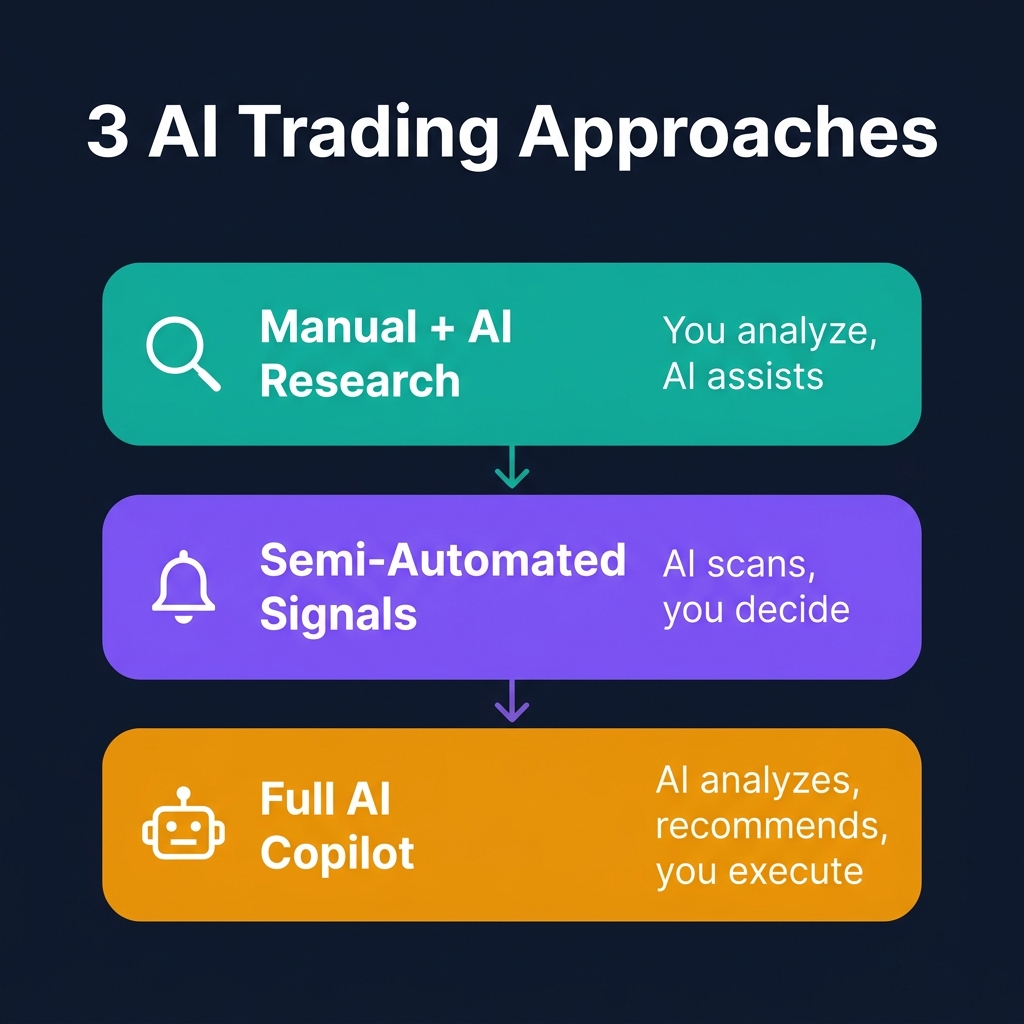
The 3 AI Trading Approaches
Before you set up anything, decide which approach matches your experience level, time commitment, and technical comfort. There is no single right answer — and many traders graduate from one level to the next over time.
Approach 1: Manual + AI Research
Best for: Complete beginners, traders who want full control
Time commitment: 30-45 minutes per day
Technical skill: None required
You do everything manually — chart analysis, trade execution, journaling — but you use ChatGPT, Gemini, or Claude as a research assistant. You paste data from CoinXSight or TradingView into the LLM and ask it to interpret indicator readings, calculate position sizes, or brainstorm scenarios.
Example workflow:
Open CoinXSight dashboard, note BTC is at $111,300 with RSI at 58
Paste data into ChatGPT: "BTC is at $111,300, RSI 58, above EMA 21/50, MACD bullish but flattening. What is the setup quality?"
Read the analysis, cross-reference with the chart
Decide and execute manually on your exchange
This is where most traders should start. You learn the mechanics without giving up control. For a deeper dive into using LLMs effectively, see our ChatGPT crypto trading guide.
Approach 2: Semi-Automated Signals
Best for: Intermediate traders who want efficiency
Time commitment: 15-20 minutes per day
Technical skill: Basic (can follow setup instructions)
You use a dedicated AI analytics platform like CoinXSight to generate structured signals — Alpha Hunter alerts, ASI Score thresholds, confluence ratings — and receive notifications when setups meet your criteria. The AI does the scanning and scoring. You review and execute.
Verify the setup on the chart (30-second visual check)
Execute on your exchange if it passes your criteria
This is the sweet spot for most active traders. The Alpha Hunter module automates the most time-consuming part — scanning hundreds of tokens — while you retain decision authority.
Approach 3: Full AI Copilot
Best for: Experienced traders who want maximum leverage
Time commitment: 10-15 minutes per day (active), always-on monitoring
Technical skill: Intermediate (comfortable with APIs, prompts)
You build or use a comprehensive AI copilot system that combines real-time data feeds, LLM reasoning, and structured alerts into one pipeline. The copilot scans, analyzes, recommends, and monitors — you review and approve.
Example workflow:
Copilot scans 500+ tokens overnight, generates a ranked shortlist
Morning briefing delivered to Telegram with top 3 setups, risk metrics, and entry zones
You review, approve, and execute
Copilot monitors positions and alerts you if conditions change
This is the most powerful approach but requires the most upfront effort to configure. Our AI Trading Copilot guide walks through building this from scratch.
Quick Comparison
Factor
Manual + AI Research
Semi-Automated Signals
Full AI Copilot
Setup time
10 minutes
30 minutes
2-4 hours
Daily time
30-45 min
15-20 min
10-15 min
Technical skill
None
Basic
Intermediate
Control level
Full manual
High (you approve)
High (you approve)
Token coverage
5-10 tokens
100-500 tokens
500+ tokens
Cost
$0-20/mo
$0-49/mo
$50-200/mo
Best starting point
Yes
After 2-4 weeks
After 2-3 months
Our recommendation: Start with Approach 1 for your first two weeks. Graduate to Approach 2 once you are comfortable reading AI analysis output. Move to Approach 3 only if you need the coverage and have validated your strategy.
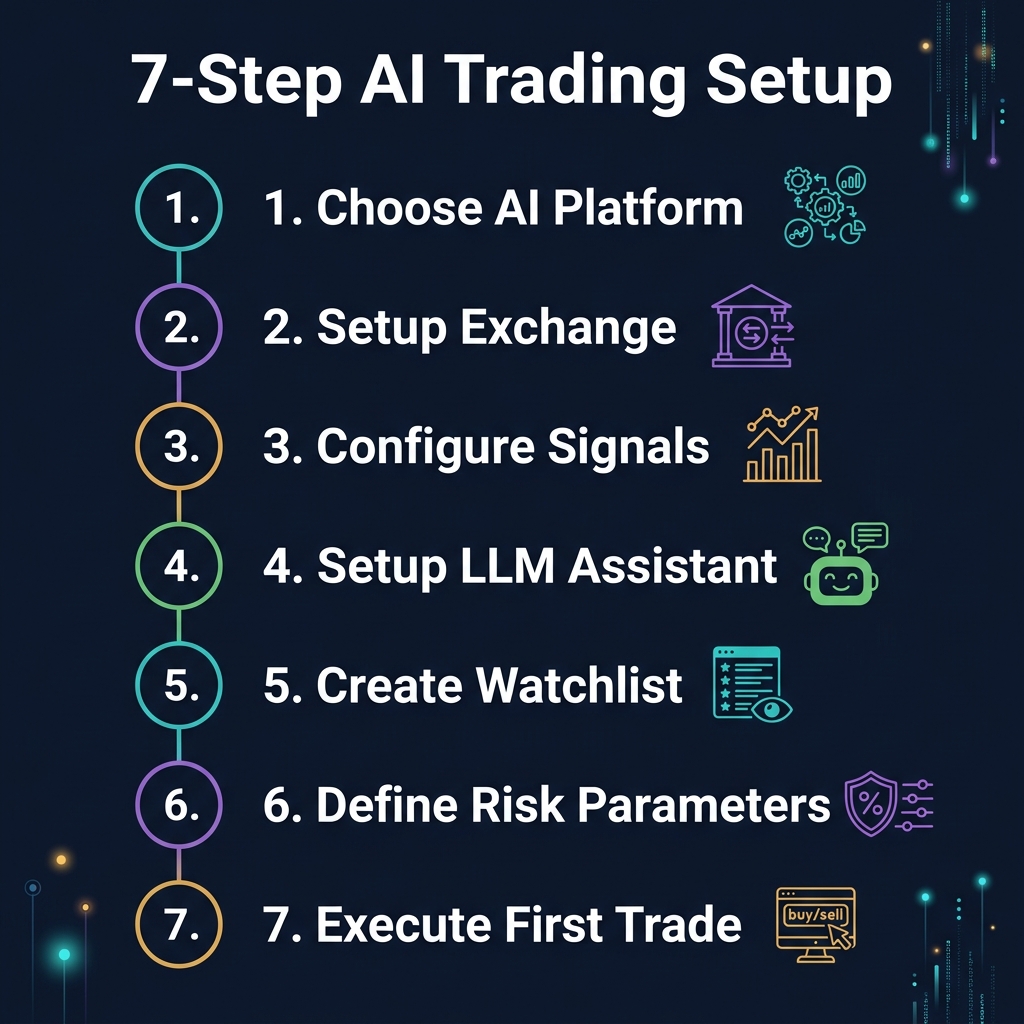
7-Step AI Trading Setup Checklist
Understanding 7 is a key part of crypto technical analysis. Most professional trading indicators on any crypto trading platform will help you apply these concepts in real time.
This is the practical core of the article. Follow these seven steps in order and you will have a fully functional AI trading setup by the end.
Step 1: Choose Your AI Analytics Platform
Your analytics platform is the foundation. It provides the data, signals, and scoring that everything else builds on.
What to look for:
Real-time data across 100+ tokens (not delayed or batch-updated)
ASI Score, Alpha Hunter, AI Analysis, Confluence Scoring across 12+ indicators
Newer platform
Free tier available, Pro from $49/mo
TradingView
Best charting, huge community, Pine Script
No AI scoring, manual analysis only
Free-$60/mo
Glassnode
Deep on-chain data
Complex for beginners, no trade signals
From $39/mo
CryptoQuant
Exchange flow data, whale tracking
Limited technical analysis
From $29/mo
LunarCrush
Social sentiment analytics
Narrow focus (social only)
Free tier available
Our recommendation: Start with CoinXSight for signal generation and AI analysis. Add TradingView for chart verification if you want visual confirmation. You do not need five platforms on day one — one good analytics source and one charting tool is enough.
Action: Sign up at app.coinxsight.com and explore the Dashboard module. Spend 15 minutes clicking through the interface before proceeding.
Step 2: Set Up Your Exchange Account
You need a centralized exchange to execute trades. If you already have one, skip to Step 3.
Recommended exchanges for AI-assisted trading:
Exchange
Why It Works for AI Trading
Fee Tier
Binance
Largest liquidity, robust API, widest token selection
0.1% spot, 0.02/0.04% futures
Bybit
Clean interface, good futures platform, competitive fees
0.1% spot, 0.02/0.055% futures
OKX
Strong derivatives, copy trading features
0.08% spot, 0.02/0.05% futures
Setup checklist:
[ ] Create account with email verification
[ ] Complete KYC (identity verification) — required for withdrawals and higher limits
[ ] Fund your account with your starting capital (we recommend $500-2,000 for beginners)
[ ] Navigate to spot trading interface and place a small test order ($10-20) to verify everything works
Important for beginners: Start with spot trading only. Do not touch futures or leverage until you have at least 30 days of profitable spot trading. Leverage amplifies both gains and losses — and losses hit harder psychologically when you are learning.
Step 3: Configure AI Signals
Now connect your analytics platform to your trading process. On CoinXSight, this means configuring your signal preferences.
Alpha Hunter configuration:
Alpha Hunter scans 500+ tokens and generates signals based on confluence of technical indicators, volume patterns, and momentum shifts. You need to configure which signals reach you.
Recommended starting filters:

Signal confidence:     HIGH only (ignore MEDIUM/LOW for first month)
Timeframe:             4H and Daily (avoid 1H — too much noise for beginners)
Minimum ASI Score:     70/100 (top 30% of scored tokens)
Volume filter:         Minimum 2x average (confirms real interest)
Token filter:          Top 50 by market cap (avoid micro-caps initially)
ASI Score thresholds:
The ASI Score combines 12+ indicators into a single 0-100 number. Use these thresholds as your starting guide:
ASI Score
Interpretation
Action
80-100
Strong bullish confluence
Active watchlist, look for entry
60-79
Moderate bullish lean
Monitor, wait for confirmation
40-59
Neutral / mixed signals
No action, stay flat
20-39
Moderate bearish lean
Caution, consider reducing exposure
0-19
Strong bearish confluence
Avoid longs, consider hedging
Action: Open Alpha Hunter on CoinXSight. Set your filters as shown above. Wait for your first HIGH confidence signal — do NOT trade until one appears.
Step 4: Set Up Your LLM Assistant
Your LLM (ChatGPT, Claude, or Gemini) acts as your on-demand analyst. It does not replace CoinXSight's quantitative signals — it adds qualitative reasoning and helps you think through trade decisions.
System prompt to save (paste this once at the start of each session):
You are my crypto trading research assistant. Rules:

1. I will provide real data from my analytics platform. Do NOT make up prices
   or indicator values.
2. When I share a setup, analyze it for: trend alignment, risk/reward quality,
   and potential pitfalls I might be missing.
3. Always include position sizing math when discussing entries.
4. Never say "this is financial advice." I know it is not. Just analyze.
5. If data is insufficient, tell me what additional data you need.
6. Be direct — skip filler language and get to the actionable points.

My risk profile:
- Account size: [YOUR SIZE]
- Max risk per trade: 2% of account
- Max daily loss: 5% of account
- Preferred timeframes: 4H and Daily
- Experience level: Beginner
Daily prompt template (use with real data from CoinXSight):
Morning scan data from CoinXSight:

BTC: $111,300 | ASI: 74 | RSI(14): 58 | Trend: Bullish | Alpha Hunter: MEDIUM
ETH: $2,680 | ASI: 68 | RSI(14): 52 | Trend: Neutral | Alpha Hunter: LOW
SOL: $178 | ASI: 81 | RSI(14): 65 | Trend: Bullish | Alpha Hunter: HIGH

Which token has the best setup today? Give me entry zone, stop, and target.
Which LLM to choose:
ChatGPT (GPT-4o): Best all-rounder for trading analysis. Strong at structured output and math.
Claude (3.5 Sonnet): Excellent at nuanced reasoning and longer context. Lower hallucination rate.
Gemini (2.5 Pro): Best for news-related research due to Google integration.
A watchlist is not "tokens I like." It is a structured, criteria-driven list of active trade candidates. Without a watchlist strategy, you will chase every alert and overtrade.
Watchlist structure:
Tier
Criteria
Max Tokens
Action
Active
ASI Score 75+, Alpha Hunter HIGH, clear chart setup
3-5
Ready to trade on trigger
Monitoring
ASI Score 60-74, improving momentum
5-10
Check daily, promote when criteria met
Radar
Interesting narrative, upcoming catalyst
10-20
Weekly review only
Rules:
Maximum 5 tokens on Active watchlist. If a new one qualifies, remove the weakest.
Review tiers every Sunday. Promote, demote, or remove based on current data.
Only trade from Active tier. Monitoring and Radar are for research, not execution.
Remove any token that drops below ASI 50 from all tiers immediately.
Action: Open your CoinXSight dashboard. Scan the top 50 tokens. Identify 3-5 that currently have ASI Score above 75 and populate your first Active watchlist.
Step 6: Define Risk Parameters
This is the step most beginners skip — and it is the most important. Without predefined risk parameters, you will make emotional decisions under pressure. Define these numbers BEFORE your first trade and write them down.
Your risk framework:
ACCOUNT RULES
━━━━━━━━━━━━━━━━━━━━━━━━━━━━
Starting capital:          $________
Max risk per trade:        2% = $________
Max daily loss:            5% = $________
Max open positions:        3 (beginners) / 5 (intermediate)
Max correlated exposure:   40% of account

POSITION SIZING FORMULA
━━━━━━━━━━━━━━━━━━━━━━━━━━━━
Position size = Risk amount / Stop distance

Example with $2,000 account:
- Risk per trade: 2% x $2,000 = $40
- Entry: $111,300 (BTC)
- Stop: $109,100 (below key support)
- Stop distance: ($111,300 - $109,100) / $111,300 = 1.98%
- Position size: $40 / 0.0198 = $2,020

EXIT RULES
━━━━━━━━━━━━━━━━━━━━━━━━━━━━
Stop loss:                 Always set BEFORE entry (no exceptions)
Take profit 1:             Close 50% at 1:1.5 risk/reward
Take profit 2:             Close remaining at 1:3 risk/reward or trail stop
Time stop:                 Close if no movement after 5 days (capital is idle)
Circuit breaker rules:
If you lose 3 trades in a row: Stop trading for 24 hours. Review all three in your journal.
If you hit daily max loss (5%): Done for the day. No exceptions.
If account drops 15% from peak: Reduce position sizes by 50% until you recover to -10%.
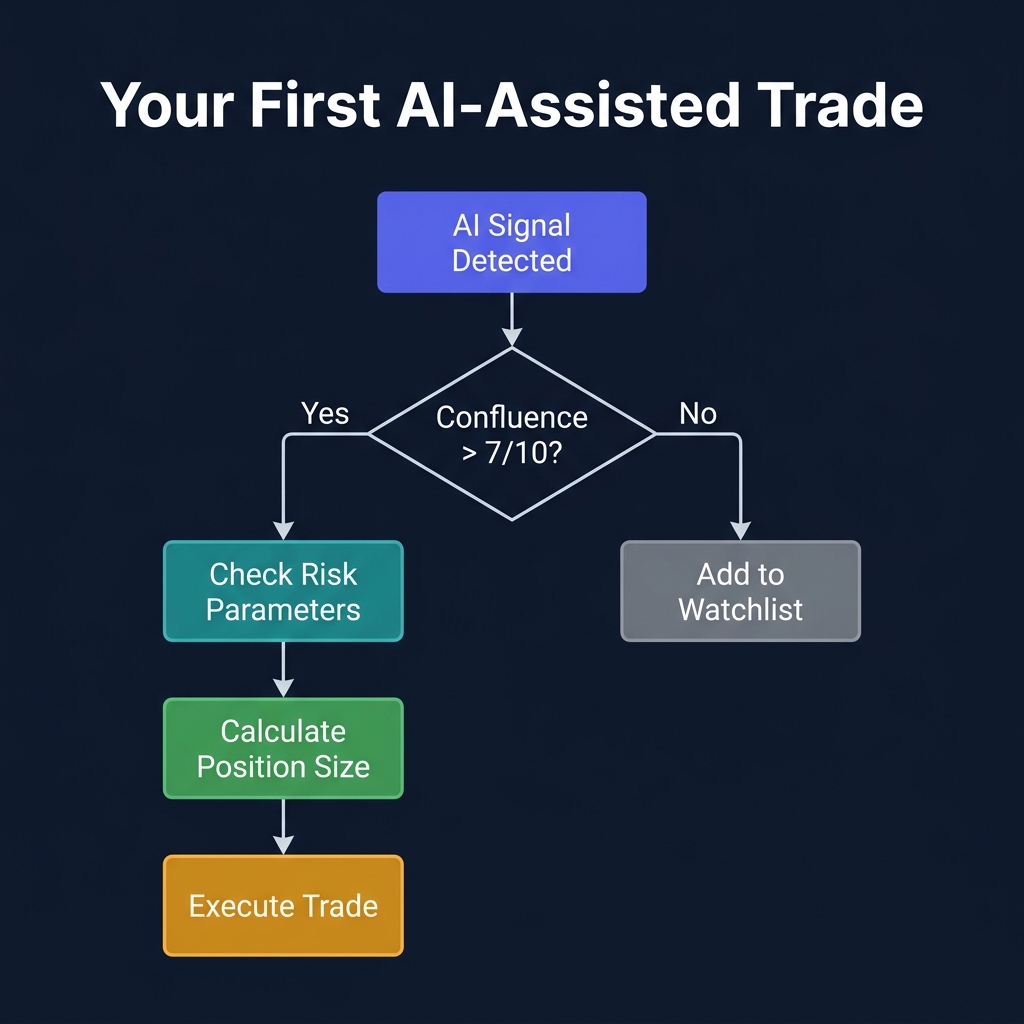
You have your platform, exchange, signals, LLM, watchlist, and risk parameters. Time for your first trade. Here is the exact decision process, step by step.
The decision flow:
1. Signal received
Alpha Hunter sends a HIGH confidence alert: "SOL — Bullish breakout detected on 4H timeframe. ASI Score: 82/100."
2. Check the data
Open CoinXSight dashboard for SOL:
Price: $178.40
ASI Score: 82 (strong bullish confluence)
RSI(14): 64 (bullish momentum, not overbought)
MACD: Histogram positive and expanding
Volume: 2.8x 20-period average (real interest)
3. Get LLM analysis
Paste the data into ChatGPT:
Alpha Hunter HIGH signal on SOL. Here is the data:

Price: $178.40 | ASI: 82 | RSI: 64 | MACD: Bullish expanding
Volume: 2.8x average | Trend: Bullish above EMA 21/50
Key resistance: $185 | Key support: $172

My account: $2,000 | Max risk: 2% ($40) | Spot only.

Should I take this trade? Give me exact entry, stop, and targets.
4. LLM responds with analysis:
"SOL setup quality: 7.5/10. Breakout with volume confirmation is strong. Entry zone: $177.50-$179.00 (current range, slight pullback preferred). Stop: $171.80 (below support + ATR buffer). Target 1: $185.00 (+3.8%). Target 2: $192.00 (+7.6%). Risk/reward: 1:1.7 to T1, 1:3.4 to T2. Position size at 2% risk: $40 / 0.037 = $1,081 in SOL."
5. Verify on chart
Open the SOL chart. Confirm:
Price IS above EMA 21 and 50 (matches AI analysis)
Support at $172 IS visible on the chart
Volume spike IS real (not a single candle anomaly)
6. Execute
On your exchange:
Place a limit buy at $178.50 (middle of entry zone)
Set stop loss at $171.80 (before placing the buy)
Note your targets: $185 (TP1) and $192 (TP2)
Position size: $1,081 worth of SOL (approximately 6.06 SOL)
7. Log the trade
Trade #001 — SOL/USDT LONG
━━━━━━━━━━━━━━━━━━━━━━━━━━
Date:       2026-05-29
Signal:     Alpha Hunter HIGH + LLM confirmation
Entry:      $178.50
Stop:       $171.80 (-3.75%)
Target 1:   $185.00 (+3.64%)
Target 2:   $192.00 (+7.56%)
Size:       $1,081 (6.06 SOL)
Risk:       $40 (2% of account)

Notes: First AI-assisted trade. ASI 82, strong volume confirmation.
Will close 50% at T1, trail stop on remainder.
Congratulations — you have completed your first AI-assisted trade with proper structure, risk management, and documentation.
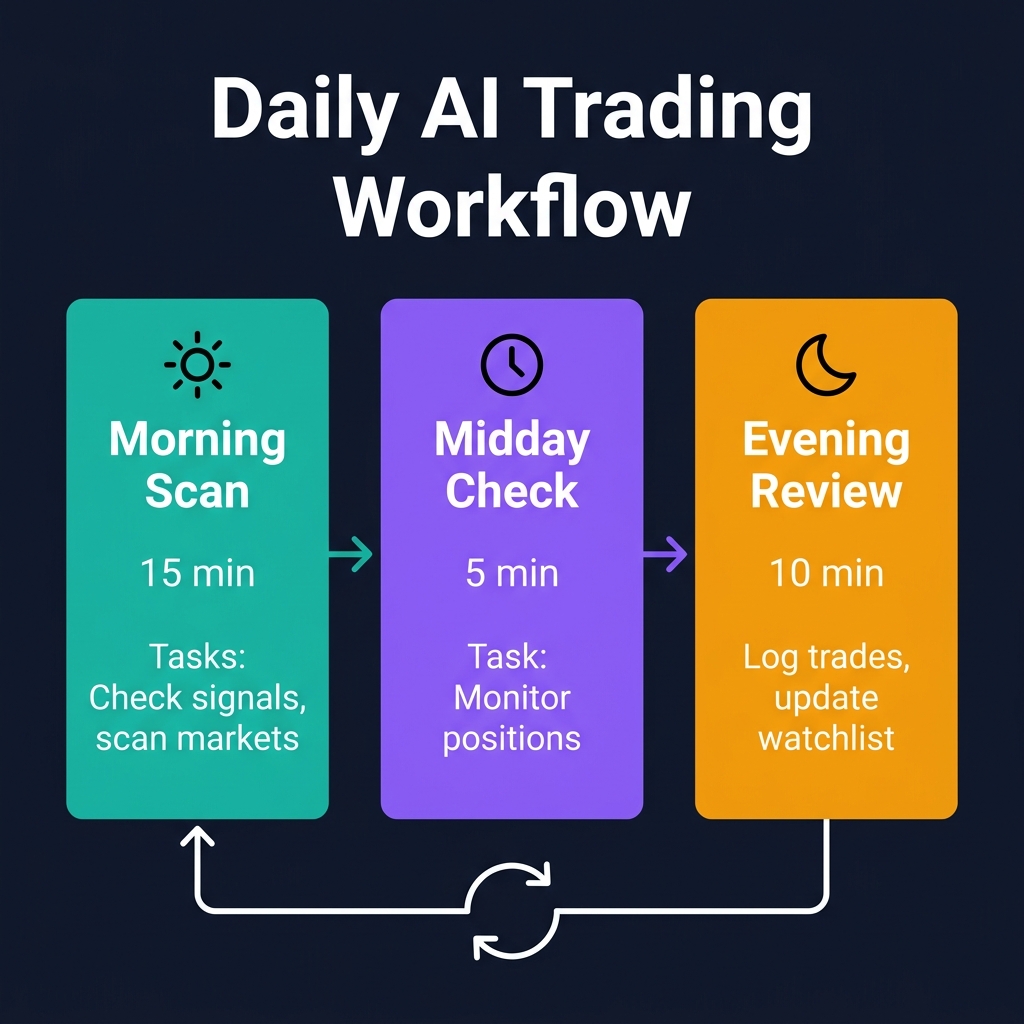
Daily AI Trading Workflow
Once your setup is running, you need a consistent daily routine. Inconsistency is where most beginners fail — they check obsessively for two days, then ignore everything for a week. This three-session workflow prevents that.
Morning Scan (15 minutes | 8:00-9:00 AM)
This is your primary analysis session. Do not trade during this session — only research and plan.
Task
Tool
Time
Check overnight Alpha Hunter alerts
CoinXSight Alerts
2 min
Review ASI Scores for Active watchlist
CoinXSight Dashboard
3 min
Paste top 3 setups into LLM for analysis
ChatGPT/Claude
3 min
Verify setups on charts
CoinXSight Chart / TradingView
5 min
Update trade plan for the day
Notes / Notion
2 min
Output: A clear plan with 0-2 potential trades, specific entry/stop/target levels, and position sizes pre-calculated.
Midday Check (5 minutes | 12:00-1:00 PM)
Quick status check on open positions and any new signals.
Are open positions on track? (Check price vs. entry and stop levels)
Any new HIGH confidence Alpha Hunter signals?
Has any Active watchlist token's ASI Score changed significantly?
Any breaking news affecting your positions? (Ask Gemini for a quick scan)
If nothing has changed: Close the dashboard and walk away. Do not invent trades that are not there.
Evening Review (10 minutes | 8:00-9:00 PM)
Close out the day with documentation and preparation.
Task
Details
Time
Update trade journal
Log any entries, exits, or adjustments
3 min
Review LLM analysis accuracy
Did the morning analysis play out? Note what was right/wrong
3 min
Scan for overnight setups
Check if any tokens are approaching entry zones
2 min
Set overnight alerts
Configure CoinXSight alerts for price triggers on Active watchlist
2 min
Weekly addition (Sunday, 20 minutes): Review all trades from the week. Ask your LLM to analyze your journal for patterns. Update your watchlist tiers. Adjust signal filters if accuracy is low.
5 Common Beginner Mistakes
Every beginner makes these. Knowing them in advance saves real money.
Mistake 1: Overloading on Tools Before Trading
You do not need five analytics platforms, three LLMs, and a custom dashboard before your first trade. Start with CoinXSight + one LLM + your exchange. Add tools only when you identify a specific gap in your workflow.
Fix: Use the minimum viable stack for your first 30 days. Expand only after you have logged at least 20 trades and can articulate what data you are missing.
Mistake 2: Treating AI Output as Gospel
ChatGPT will confidently tell you SOL is "primed for a breakout" even when it is making up context. LLMs are reasoning tools, not oracle machines. They sound authoritative even when they are wrong.
Fix: Every AI recommendation gets verified against CoinXSight's quantitative data (ASI Score, Confluence Score). If the numbers disagree with the LLM's narrative, trust the numbers.
Mistake 3: Skipping the Risk Step
"I will set my stop later" is the most expensive sentence in trading. Beginners skip Step 6, enter a position, watch it go against them, and then freeze because they have no exit plan.
Fix: Your stop loss must be placed BEFORE or simultaneously with your entry order. If your exchange does not support bracket orders, place the stop immediately after the entry fills. No exceptions.
Mistake 4: Chasing Every Signal
Alpha Hunter might generate 10-15 signals per day across all confidence levels. If you trade all of them, you will overtrade, pay excessive fees, and burn out. The goal is selectivity, not activity.
Fix: Trade only HIGH confidence signals that also pass your ASI Score threshold (70+) and appear on your Active watchlist. This typically means 1-3 trades per week, not per day.
Mistake 5: Not Journaling Trades
Without a journal, you cannot improve. You will repeat the same mistakes because you never analyzed what went wrong. The AI can review your journal and spot patterns you miss — but only if the journal exists.
Fix: Log every trade using the template from Step 7. Every Sunday, paste your weekly trades into your LLM and ask: "What patterns do you see in my winning vs. losing trades?"
How CoinXSight Simplifies the Setup
Most of the 7-step checklist involves configuring tools and connecting data sources. CoinXSight consolidates the majority of these steps into a single platform:
One Dashboard, All the Data
Instead of switching between five tabs — price charts, on-chain data, social sentiment, news feeds, and indicator tools — the CoinXSight Dashboard unifies everything into one view. ASI Score, Alpha Hunter signals, trend status, and confluence ratings are all visible at a glance.
Signal Generation Without Configuration
Alpha Hunter runs 24/7 with pre-tuned algorithms. You do not need to set up custom scanners, code Pine Script indicators, or build webhook pipelines. Configure your confidence threshold and timeframe preference — signals start flowing immediately.
Built-In Risk Context
Every Alpha Hunter signal includes risk context: suggested stop levels, current volatility (ATR), and correlation with BTC. This is the data you would otherwise need to calculate manually or ask your LLM to derive.
AI Analysis Integration
The AI Analysis module provides LLM-powered reasoning on any token — the same kind of qualitative analysis you would get from ChatGPT, but pre-built with live market data and no hallucination risk on prices and indicators.
From Scan to Trade in 3 Clicks
Receive signal (Alpha Hunter alert or dashboard scan)
No data pasting. No prompt engineering. No context switching between five tools. The entire Approach 2 workflow happens inside one platform.
Explore the full platform at app.coinxsight.com and start your first AI-assisted scan today. For more on choosing the right tools, see our Best Crypto App Guide.
AI trading in 2026 is not about replacing your judgment — it is about amplifying it. The setup matters because it determines how efficiently you can process information, identify opportunities, and manage risk. Start simple with one analytics platform, one LLM, and one exchange. Follow the 7-step checklist, run the daily workflow, and log every trade. The compounding effect of consistent, AI-assisted decision-making will show in your results within weeks, not months. The best traders are not the ones with the most tools — they are the ones who use the right tools consistently.
Disclaimer: The technical setups, workflows, and tool configurations discussed herein are for informational and educational purposes only and do not constitute financial advice. Past performance of automated setups does not guarantee future results. Cryptocurrency markets are subject to high volatility; trade responsibly and apply proper risk management.
KZ
Dr. Kevin Zhang
AI // QUANT LABS
Principal AI & Quantitative Researcher·Deep Alpha Engine Labs
Ph.D. in Computational Statistics. Leads machine learning architecture, regime-switching detection, and automated execution systems at CoinXSight Labs.
QUANTITATIVE SUITE // DEEP ALPHA ENGINEACTIVE
BTC/USDT // LIVE SCANNER
CONFLUENCE 100
LIVE SPOT PRICE$83,028.15STRONG_BUY
TP2
$90,531.13
+9.80%
TP1
$85,681.86
+3.92%
ENTRY
$82,449.02
ZONE
SL
$80,832.60
-1.96%
Auto-detect Order Blocks, Fair Value Gaps and risk-adjusted DCA ladders in < 5s.